Use Strapi & Next.js to bootstrap your blog site with high volume on free tier
Posted on
As a front end Web developer who likes to code, I think it's reasonable to start my own blog to document what I learned on web development, and there are multiple options to choose from when building a blog site, they are all viable options, I'll start from the one require no coding skills, all the way up to the one that needs the most coding skill :
-
Wix: super easy to use, no coding skill required, they have a free tier, but the bandwidth and storage are very limited, and it comes with Ads, which is a big no-no to me.
-
WordPress: a popular choice, little or no coding skill required, you got plenty of themes to choose from, if you can go over $28 per month, you can install tens of thousands of plugins. the free tier is pretty much the same as Wix, it contains Ads, plus, it suffers from security and performance.
-
ghost.js: this one is heavily geared towards a blog site, like WordPress, you can go for self-hosting to reduce your expense if you have a site with high volume. but unlike WordPress, it's fast and secure, the downside is it lacks themes.
-
strapi + Next.js: this one involves lots of code skill, but highly customizable, strapi is an open-source headless CMS to help bootstrap your API, it doesn't have a cloud platform yet, so you have to find a place to host it, on the front end, I choose Next for its ability to generate pages at build time to maximize the performance, I'll go over the detail below:
As a web developer, I'd like to build a website that is highly customizable, high performance, and secure. I've thought about building a static website with vanilla HTML, CSS, that's ok. But I'd like to keep my posts in a database, so when I want to change the tech on the front-end, I can still use the same API to get my data back easily, after doing some research, I've made my decision:
- server & database: Heroku
- frontend framework: Next.js
- website host: Netlify
- image storage: Cloudinary
Currently, Heroku provides server hosting for free with its iconic mechanism Sleeps after 30 mins of inactivity, very limited RAM, and operation time, but it's not a problem since I only need to access it at build time. Thanks to Static Generation functionality on Next.js, it pre-rendering my pages. another reason to choose Heroku is it comes with 1 GB storage on the free tier of PostgreSQL.
As for the frontend framework for static generation, there's actually another viable choice calls Gatsby, the reason I choose Next.js over Gatsby is mainly because of its flexibility, it can have some pages building with static site generation and others using server-side rendering or client-side rendering for dynamic content.
Then, since it's a static website, both Netlify & Vercel[^first] are good choices to host it, I choose Nelify because It has less restriction on how do you use your apps.
As you might have noticed, the 1 GB storage on a database is small if you want to store images, and that's where Cloudinary comes in, for a free tier plan, it generously offers 25 GB on storage & viewing bandwidth combined.
With those tech combined, It has a lot of storage space for a free tier plan, the downside is one has much to learn about each of them and put it all together, if you are interested in the repo of this blog website, check it here.
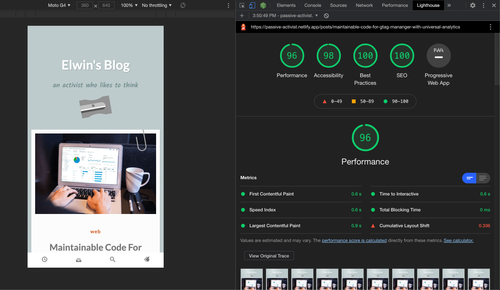
p.s. The cover image is the rating of my blog site on Lighthouse[^second], a score that is hard to achieve if using option 1 or 2.
[^first]: Vercel is a deployment and collaboration platform for frontend developers. [^second]: an automated tool developed by Google, has audits for performance, accessibility, progressive web apps, SEO, and more.